logo
Welcome Guest! To enable all features please Login or Register.

Notification

Icon
Error

Options
Go to last post Go to first unread
zigfrie09  
#1 Posted : Tuesday, June 2, 2026 5:32:10 AM(UTC)
zigfrie09

Rank: Newbie

Joined: 6/1/2026(UTC)
Posts: 1
United States
Location: CA

V25 how can I scale the drawing like in older versions? working with architectural plans requires to set the drawing scale from the beginning, scales like 1/8", 1/4' and 1/2' are vastly used in creating 2d plans, specially if those are going to be submitted to Building and Safety for plans check to get the approval. for Example the plot plan usually is created using 1/8" scale, because it shows the the whole property and the dwelling, the legal description of the property, the sheet index and the general noes that briefly explains the scope of the work, plus the tab information at the right, to do so the lot size must be according to the scale, otherwise all that information that I'm describing before will not fir or if we just try to print to scale.
Any idea how to scale a drawing from the beginning instead to just print to scale, which makes more difficult and leaves out of the sheet valuable and required information used for plan check engineers
Patricia G.  
#2 Posted : Tuesday, June 2, 2026 1:42:51 PM(UTC)
Patricia G.

Rank: Administration

Joined: 11/1/2002(UTC)
Posts: 7,800

Thanks: 9 times
Was thanked: 157 time(s) in 154 post(s)
Hi there,

I am an Architect and I am an AIA - International Associate since 2004. I agree about the requirements for permits and other building documents, however, things work differently with current CAD programs, like Punch.

Originally Posted by: zigfrie09 Go to Quoted Post
working with architectural plans requires to set the drawing scale from the beginning, scales like 1/8", 1/4' and 1/2' are vastly used in creating 2d plans, specially if those are going to be submitted to Building and Safety for plans check to get the approval.
For current CAD programs, the first rule is: the drawing scale is always 1:1, meaning you draft objects at their true, real-world size. Printing scale is the reduction or ratio applied to that full-size model so it fits onto a standard piece of paper, not the workspace (as it was in previous versions).
So, for example, if you draw a wall with length=10 ft you will see 10ft on your Punch screen => Your units (inches, ft, or meters) represent real-world objects, not paper size.

Now, regarding your second question:
Originally Posted by: zigfrie09 Go to Quoted Post
Any idea how to scale a drawing from the beginning
The basic option is => visualize the floor plan => Print => PDF => Select the scale, paper, etc. You must calculate the necessary paper size for your project.

If you are interested, my collection (Printing Solutions Collection), includes a set of templates for floor plans and elevations with different paper sizes. In this way, you will place the frame in your drawing and the PDF printing will be scaled and clearly visible on the screen or paper. The collection also includes tutorials.
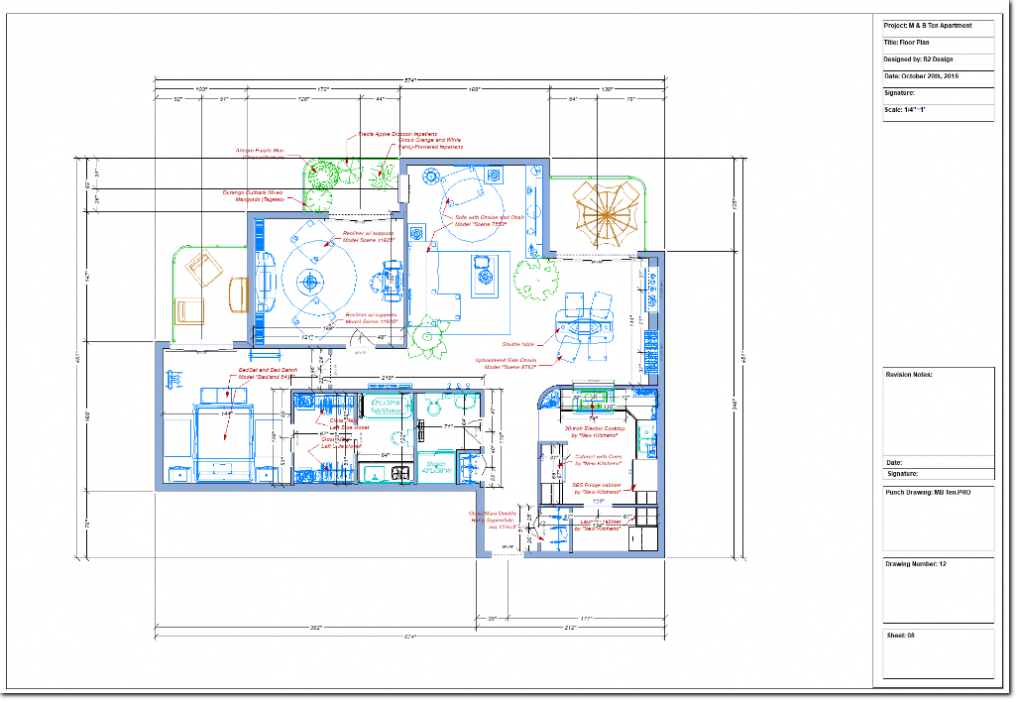
UserPostedImage

Hope this helps.


Patricia G.- Forum Moderator
My Website: Punchhelpers
My Facebook page: Punchhelpers on Facebook
My eBooks: Pat’s eBooks
My Store: Punchhelpers Store
Users browsing this topic
Guest (2)
You cannot post new topics in this forum.
You cannot reply to topics in this forum.
You cannot delete your posts in this forum.
You cannot edit your posts in this forum.
You cannot create polls in this forum.
You cannot vote in polls in this forum.
